×
   TuneFab Discord
Join 10,000+ TuneFab Fans on Discord
TuneFab Apple Music Converter – Convert Apple Music to MP3 Losslessly
Apple Music
Downloader Online

down-loading

Please wait... . . .

pop-close down-pop

Feel too slow?

Speed up the conversion right away!

Speed Up Now

Why Convert Apple Music to MP3?

Simply put, converting Apple Music to MP3 lets you truly own and use your music without restrictions. That is exactly what TuneFab Apple Music Converter is designed for.

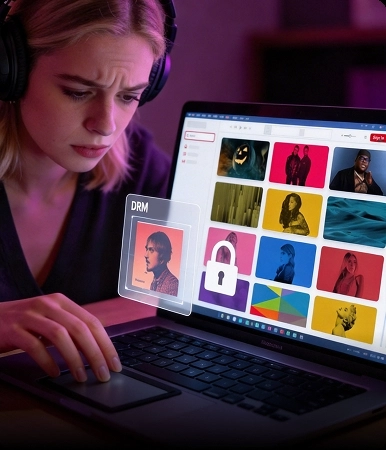
Keep Apple Music Streams Offline
Keep Apple Music Accessible Offline

Once converted, you can save your favorite songs, albums, and playlists as MP3 files for true offline listening even when your Apple Music subscription ends.

Play Your Music Collection Across Platforms

No longer limited by the protected Apple Music .m4p format. With TuneFab, you can freely transfer and play MP3 downloads on any device and media player.

Use Apple Music Tracks Creatively

Converting Apple Music songs to MP3 makes it possible to make custom ringtones, burn CDs for backup, or add to video projects as background music.

Keep Apple Music Streams Offline

Once converted, you can save your favorite songs, albums, and playlists as MP3 files for true offline listening even when your Apple Music subscription ends.

Play Your Music Collection Across Platforms

No longer limited by the protected Apple Music .m4p)format. With TuneFab, you can freely transfer and play MP3 downloads on any device and media player.

Use Apple Music Tracks Creatively

Converting Apple Music songs to MP3 makes it possible to make custom ringtones, burn CDs for backup, or add to video projects as background music.

The Best Apple Music Converter for Windows & Mac

Download Songs from Apple Music to PC/Mac

Download Songs from Apple Music to PC/Mac

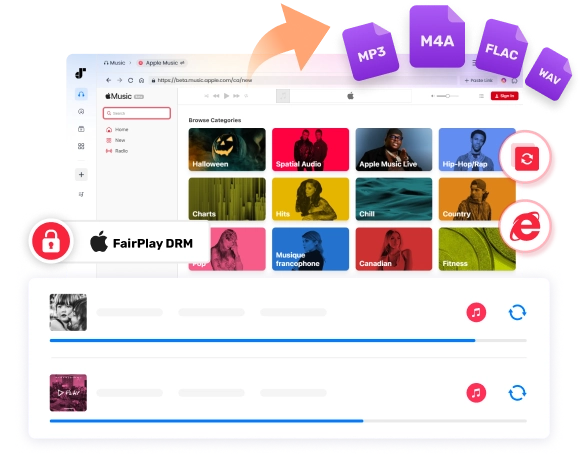
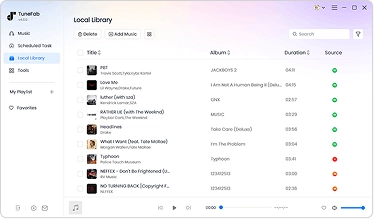
As a professional Apple Music converter for Windows and Mac, TuneFab goes beyond the official built-in download limits. Instead of locking music inside the Apple Music app, this converter lets you save music from Apple Music to your computer directly.

Whether you want to download Apple Music songs, entire playlists, or M4P tracks, this powerful Apple Music to MP3 converter handles it all. This is especially useful if you want to enjoy Apple Music offline on multiple devices, build a permanent local library, or add music to other apps.

Export Apple Music to Various Formats with Lossless Quality

Convert Apple Music to MP3 and More Formats for Lifelong Offline Access

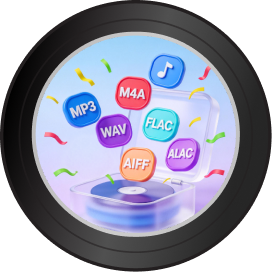
TuneFab Apple Music Converter lets you convert Apple Music to multiple output formats, including MP3, M4A, WAV, FLAC, ALAC, and AIFF. This way, you can effortlessly play Apple Music in a car, iPod Nano, iPod Classic, iPod Shuffle, iPhone, Android, Apple Watch, and more devices without limitations.

Plus, TuneFab's built-in format converter brings you to the next level, enabling you to convert your local audio files for seamless playback and sharing, giving you complete control over your music collection.

Convert Apple Music to MP3
High-Quality Music Output

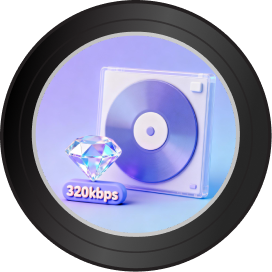
Keep Original Quality at 320kbps & 48kHz

No need to worry about quality loss. With TuneFab Apple Music Converter, you can maintain the original sound quality when downloading Apple Music lossless songs, ensuring clear, detailed sound that stays true to the original tracks.

Beyond this, you can also manually adjust the bitrate and sample rate to reach the optimal output quality - 320 Kbps MP3 with 48 kHz or lossless WAV and FLAC.

Handle Apple Music Conversion at Ultra-Fast Speed

35X Faster Speed with Stable Performance

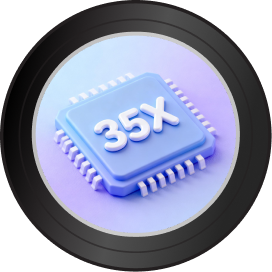
Unlike many Apple Music converters that slow down or fail during large downloads, TuneFab Apple Music Converter features advanced hardware acceleration technology, so you can download songs from Apple Music to MP3 at 35X speed.

Even when processing entire playlists or albums, the conversion remains smooth and reliable, with no unexpected interruptions, no stuck tasks, and no frequent download failures. Under a stable network connection, you can finish converting a single song from Apple Music in only 5 seconds!

Accelerate to 35X Speed - Convert Music Almost Instantly
Flexible Control Options. No Expertise Needed

One Click Batch Conversion. No Expertise Needed

Thanks to the integrated Apple Music web player, converting protected AAC files is quick and hassle-free. All songs, albums, and playlists are equipped with download buttons, allowing you to add music to convert without effort.

Then, you can easily customize output format, bitrate, and sample rate in one place, no extra iTunes installation or complicated steps needed.

Manage Your Apple Music Library with Full Control

Retain ID3 Tags with Customizable Options

This lossless Apple Music converter ensures your music collection remains professional and easy to manage. All ID3 tags and metadata are preserved during conversion, including title, artist, album, cover, genre, and more.

Want a more personalized Apple Music download experience? The built-in ID3 Tag Editor is ready to let you edit or add ID3 information! This can be helpful if you decide to store Apple Music songs on your external hard drive and build an organized digital music library.

Retain ID3 Tags & Organize Songs by Metadata
Support Custom File Archiving Rules

Support Custom File Archiving Rules

If you need to manage hundreds or even thousands of Apple Music tracks, TuneFab's custom file archiving rules make the process effortless. Before downloading, you can preset how your converted Apple Music files are named and stored on your computer.

This professional Apple Music downloader will automatically archive your downloaded songs in folders by default, playlists, artists, albums, etc, saving you hours of manual sorting time.

More Features That Make TuneFab Apple Music Converter Stand out

Intuitive Interface

Intuitive Interface

A stupid-simple UI design makes it easy to use for everyone.

Stable Performance

Stable Performance

It works smoothly and flawlessly on both Windows and macOS.

Highly-Success Conversion

Highly-Success Conversion

Reach 98% and an even higher conversion rate to output Apple Music songs

Lyrics Download

Lyrics Download

Download lyrics as LRC files to follow along while listening.

Download Task Management

Download Task Management

Keep track of all downloads with failure notifications, count alerts, and completion sound prompts.

Proxy Settings

Proxy Settings

Set up a proxy to access music content from different regions without restrictions.

Multi-Language Support

Multi-Language Support

It supports English, Japanese, German, French, and Chinese.

Always Improving

Free Lifetime Upgrading

Free to get every major release and every latest version.

24/7 Professional Support

24/7 Professional Support

Our experienced team ensures your Apple Music converter performs smoothly.

Comparison: TuneFab Apple Music Converter vs. Other Converting Solutions

Features TuneFab Apple Music Converter Recording Tools Apple Music Downloaders Online
Permanent Offline Access yes Yes, no restrictions Yes Yes
Output Formats yes MP3, M4A, WAV, FLAC, ALAC, and AIFF Varies by software Mostly MP3 only
Output Quality yes Original 320kbps MP3 or lossless FLAC/WAV Quality loss Compressed or low bitrate
Conversion Speed yes Up to 35X faster 1X 1X
Batch Conversion yes Convert playlists & albums in bulk Manually one by one Limited or No Batching
Stability for Large Playlists yes Smooth & stable Not supported Prone to slowdowns or failed tasks
Built-in Apple Music Web Player yes Yes, no iTunes or extra apps needed Not supported Not supported
ID3 Tag Preservation yes Full Metadata & Lyrics Manual editing required Often missing
Ease of Use yes Beginner-friendly Complicated setup Simple but limited
Success Rate yes High (Nearly 100%) Medium (Affected by various factors) Low (Frequent failures)

Tutorial: How to Download Apple Music as MP3 in 3 Simple Steps

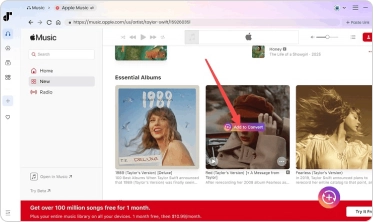
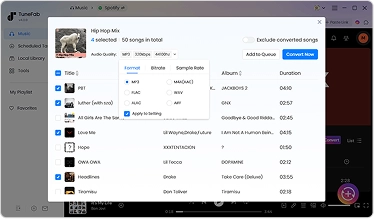
After a 3-step conversion: launch TuneFab Apple Music Converter, add songs, and start converting, you will get unlimited & high-quality Apple Music tracks forever!
Step 1.

Log in to the Apple Music web player on TuneFab and add Apple Music songs to convert.

Step 2.

Customize parameters, including audio format, sample rate, bitrate, output tracks archive, etc.

Step 3.

Complete the music download by clicking on "Convert Now".

Log in to YouTube Music
Add YouTube Music to Convert
Convert YouTube Music to MP3

What Our Users Say

Peter Robertson
Peter Robertson

"I happened to find this audio converter and it works perfectly to convert my Apple Music tracks. Super easy-to-use and it greatly helps in taking control of my music library. "

Raz Milton
Raz Milton

"Compared with other similar software I've tried, TuneFab should be the most stable one. Its conversion speed can reach up to 35X faster. The sound quality is good, and bugs are minimal. Definitely worth the purchase."

>>Read More
Terrance Jones
Terrance Jones

"What I love about TuneFab is they have always been responsive and effective in fixing problems. I once met with an issue regarding a slow conversion. The team gave quick replies and released a corrective update which helped resolve my problem. Many thanks to the support team!"

Trust from 100+ Industry Experts

"TuneFab has created software that is an all-in-one solution, comes with a plethora of features, results in no loss of quality, and offers great value for money for its customers."

SOFTPEDIA

"It is a dedicated app that has a solid reputation for removing protection from Apple Music songs, playlists, and albums"

"Try out TuneFab Apple Music Converter for Mac and Windows PC, if you want to have a more seamless music conversion experience. Three features make it a worthy contender: Versatility, Top Speed, and High Competency."

"TuneFab allows the users to get the MP3 version of their purchased media, in order to let them listen to it anytime and anywhere, on whichever device they prefer. In this context, TuneFab claims that their Apple Music Converter is one of the best out there."

"TuneFab Apple Music Converter can be your perfect solution for audio conversion of Apple Music files. It's a fairly simple application that takes just a few clicks to convert one or a bunch of files. "

"TuneFab has created software that is an all-in-one solution, comes with a plethora of features, results in no loss of quality, and offers great value for money for its customers."

"It is a dedicated app that has a solid reputation for removing protection from Apple Music songs, playlists, and albums"

"Try out TuneFab Apple Music Converter for Mac and Windows PC, if you want to have a more seamless music conversion experience. Three features make it a worthy contender: Versatility, Top Speed, and High Competency."

"TuneFab allows the users to get the MP3 version of their purchased media, in order to let them listen to it anytime and anywhere, on whichever device they prefer. In this context, TuneFab claims that their Apple Music Converter is one of the best out there."

"TuneFab Apple Music Converter can be your perfect solution for audio conversion of Apple Music files. It's a fairly simple application that takes just a few clicks to convert one or a bunch of files. "

Frequently Asked Questions

1. Is TuneFab Apple Music Converter free?

Yes. New users can enjoy a free trial version that allows you to download three full songs from Apple Music at no cost (the same limit applies to other supported platforms), with full features during this period. Once the free quota is used up, a paid subscription is required to continue.

2. What are the supported formats of TuneFab Apple Music Converter?

Supported input formats: Apple Music songs, playlists, albums, etc.
Supported output formats for Windows/Mac: MP3, WAV, FLAC, AIFF, M4A (AAC and ALAC codecs)

3. How to activate TuneFab Apple Music Converter?

Launch the software and a free-trial window will pop up. Log in to the account center with your license code and email address. And then update the account status on the pop-up window.

4. What conversion speed does TuneFab Apple Music Converter support?

TuneFab Apple Music Converter supports 35X conversion speed on both Windows and Mac systems. When the network condition is fast and stable, it can download songs even faster.

5. Can I improve the quality of Apple Music output?

Yes. While Apple Music uses 256kbps AAC, TuneFab allows you to convert Apple Music songs to MP3 320kbps and 48kHz or choose FLAC/WAV/ALAC to preserve the 100% original lossless fidelity. Therefore, you can enjoy the original music playback after downloading the tracks offline.

6. How to upgrade to the web player version if I am using the older version of TuneFab Apple Music Converter?

To update to the latest TuneFab Apple Music Converter, you should uninstall the old version. Then, download the program from the official download center and reinstall it on your computer. No auto-upgrade feature is available to process the direct update from the iTunes-dependent version to the brand-new one with the Apple web player integrated.

7. Can I improve Apple Music quality in the output?

While Apple Music's Lossless tier starts at CD quality, which is 16-bit at 44.1 kHZ, TuneFab Apple Music Converter provides a higher sample rate at 48 kHz, with the highest 320 Kbps bitrate to download Apple Music with better quality. Therefore, you can enjoy the same lossless music playback after downloading the tracks offline.

8. Can I use TuneFab to download Apple Music to MP3 online?

Yes! TuneFab offers an online Apple Music to MP3 tool that lets you download Apple Music songs, playlists, and albums as MP3 files. For playlists and albums, the tool can download all tracks in batch and package them into a ZIP file for easy download to your device. You can choose between 128kbps and 320kbps quality.

Try TuneFab Apple Music Converter Today

A truly must-have audio converter for every Apple Music subscriber. Try it now!

System Requirements:

Windows 7 or later on 64bit is required.
Mac OS X 10.15 or higher

Ratings:

4.8/5

try_star

1-Month: starting at $25.95

1-Year: starting at $79.95 ($6.66/mon)

Single Lifetime: starting at $99.95

Supported Formats:

MP3, WAV, FLAC, AIFF, M4A (AAC and ALAC codecs)

streamer
Back to top